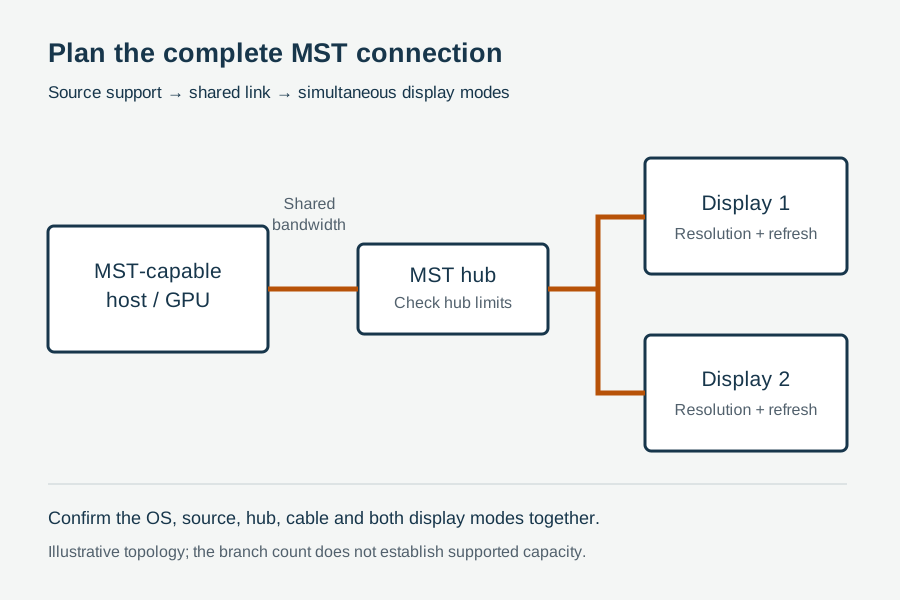
A DisplayPort Multi-Stream Transport plan begins with one physical output but does not end with a cable count. The source has to expose enough display pipelines, the link has to carry the combined streams, the hub or first daisy-chain monitor has to allocate them, and every downstream display must accept its assigned timing. A USB-C port can add another constraint because DisplayPort lanes may be shared with USB data. Operating-system, driver, firmware and sleep-state behavior can decide whether a layout that works once is suitable for a fleet.
VESA introduced MST so one DisplayPort connection can transport multiple independent display streams. Those streams may be separated by an external MST hub or passed through displays that provide a supported DisplayPort output for daisy chaining. “Independent” matters: MST is not merely a splitter that copies one picture. It can carry different desktops, subject to the capabilities and resource limits of the complete route.
For a buyer, the safe question is therefore not “Does this cable support three monitors?” It is: Which simultaneous monitor modes has this named source-and-route combination demonstrated, and which lower modes are acceptable if the preferred envelope is unavailable?
Begin with a route manifest, not a monitor total
Give every component a position in the route before calculating anything. A useful manifest fits on one page:
| Route field | What to record | Why it changes the decision |
|---|---|---|
| Source | Computer, GPU or embedded controller model | Determines physical display engines and vendor-supported monitor count |
| Output | Full-size DP, Mini DP, USB-C DP Alt Mode, dock output or Thunderbolt path | Determines lane arrangement and intermediary behavior |
| Software state | OS build, graphics driver, dock/hub firmware | Can change enumeration, DSC, hot-plug and sleep recovery |
| First intermediary | Exact MST hub, dock or first daisy-chain display | Allocates streams and may introduce its own port/mode limits |
| Downstream branch | Connector type, conversion device and cable length for each display | Conversion and transport constraints can differ by branch |
| Displays | Exact model and input used | Establishes accepted timing, MST input/output functions and menu settings |
| Preferred mode | Resolution, refresh rate, color format and other required features per display | Defines the simultaneous operating envelope rather than a vague resolution label |
| Fallback | Approved lower operating point for each display | Prevents an improvised field compromise from becoming an undocumented standard |
Do not combine “monitor model” and “required mode.” The same panel may expose more than one input, accept different maximum timings on different inputs or reserve its DisplayPort output for certain settings. Likewise, a laptop specification that says it can drive several displays may apply only through a particular dock, port combination or internal-display state. Model documentation should be attached to the manifest rather than summarized from memory.
This discipline also stops a common purchasing mistake: approving a hub because a demonstration used three monitors, while the production requirement uses different panels, refresh rates or a USB-C data workload. The demonstration and deployment are not the same operating point.
Apply three gates before doing a bandwidth estimate
Bandwidth is important, but it cannot create display engines or unsupported topology functions. Check three binary gates first.
Gate 1: Does the source support the requested number of active displays?
GPU and system vendors publish model-specific multi-display limits. That count can depend on the processor generation, graphics configuration, dock, enabled internal panel and port combination. Intel’s support guidance, for example, directs users to the processor graphics specifications and system manufacturer because the supported display count is product-specific. Treat the source limit as a separate gate from link bandwidth.
If the source supports only the internal display plus two external displays, a four-port MST hub does not manufacture two more graphics pipelines. Some products may mirror an existing stream or leave a branch inactive; the exact failure behavior is platform-dependent. Record the vendor-supported count and the tested count separately.
Gate 2: Is MST supported and enabled at each topology junction?
An external hub needs an MST-capable upstream source. A daisy chain also needs the first display to accept the upstream stream and expose an MST-capable output. Its on-screen menu may require MST or DisplayPort mode to be enabled. The last display does not need an outgoing branch, but every intermediate display does.
Connector shape does not answer this gate. A USB-C receptacle may or may not expose DisplayPort Alt Mode. A DisplayPort output on a monitor may be an MST output, a mirrored service function or absent entirely. Check the named manual and menu state.
Operating-system behavior must also be verified. Dell’s official daisy-chain guidance, for example, distinguishes platform support and notes limitations for some Apple systems. That is not a reason to generalize about every computer. It is a reason to include the exact OS and host model in the acceptance matrix instead of assuming that standards support guarantees platform implementation.
Gate 3: Can every branch deliver the required signal type?
A native DisplayPort branch and a branch ending in HDMI conversion are not interchangeable evidence. If a monitor uses HDMI, treat the converter as a named component and verify direction and active/passive requirements separately in the DisplayPort-to-HDMI direction guide. This article does not reproduce DP++ or converter selection rules.
Similarly, an MST hub with USB-C upstream is not proof that any USB-C charging cable will carry video. The cable and port must support the required alternate mode and lane rate. When a dock sits between the source and hub, the dock becomes another topology junction with its own display and bandwidth limits.
Only after all three gates pass is a combined-stream budget meaningful.
Build a bandwidth envelope from simultaneous modes
MST shares the upstream DisplayPort transport among downstream streams. More pixels per frame, more frames per second and richer pixel encoding generally consume more of that shared resource. Blanking intervals, transport encoding and protocol overhead mean that multiplying visible width, height, refresh rate and bits per pixel is only an estimate; it is not a certified capacity calculation.
Start the worksheet with one row per display:
| Display branch | Preferred timing | Required color/feature state | Compression allowed? | Fallback timing | Priority |
|---|---|---|---|---|---|
| A | Record exact mode | Record exact requirement | Yes / No / Unknown | Record approved lower mode | 1, 2, 3… |
| B | Record exact mode | Record exact requirement | Yes / No / Unknown | Record approved lower mode | 1, 2, 3… |
| C | Record exact mode | Record exact requirement | Yes / No / Unknown | Record approved lower mode | 1, 2, 3… |
Then obtain a supported bandwidth calculation from the GPU, hub/dock or display vendor for that exact route. VESA’s public materials describe the link-rate framework, while the implementation vendor can state which combined modes its device exposes. If the vendor provides a mode table, use its stated assumptions. Do not silently carry a table from one dock, graphics family or firmware revision to another.
The link’s headline raw rate is not the sum available to visible image data. DisplayPort HBR3, for example, operates at 8.1 Gbit/s per lane and four lanes provide a 32.4 Gbit/s raw aggregate; transport encoding and overhead reduce usable payload. Later UHBR rates use different transport characteristics. A procurement sheet should not subtract an invented fixed percentage across every DisplayPort generation. Use the correct calculation method and official device constraints.
DSC can extend an envelope, but only as an end-to-end feature
Display Stream Compression can allow higher combined display modes within a link budget. VESA describes DSC as visually lossless compression, but its presence cannot be assumed from a resolution badge or DisplayPort revision alone. The source, relevant intermediary and destination path must support the required DSC operation. A hub’s marketing line is not evidence that the host has enabled DSC for the tested monitors.
Record DSC in the manifest as required, not required or unknown. If a target layout only works with DSC, test that layout after cold boot, sleep/wake, reconnect and driver update. Also define a non-DSC fallback if the project needs service continuity across mixed computers.
Reserve uncertainty instead of spending every theoretical unit
A design that fits only at the edge of a paper calculation is a poor fleet baseline. Monitor firmware may advertise several timings; a driver update can change the selected color format; a dock may allocate resources differently when another port is occupied. The remedy is not a universal safety percentage. The remedy is a controlled, model-specific validation with the exact concurrent workload and a documented fallback.
Treat a calculator result as permission to test, not permission to purchase at scale.
USB-C makes lane allocation a first-class field
DisplayPort Alt Mode over USB-C can use different lane arrangements. Depending on the host, dock and negotiated configuration, the connection may allocate four high-speed lanes to DisplayPort or retain lanes for simultaneous high-speed USB data. The resulting display envelope can therefore change even when the connector and monitor list look identical.
Ask four questions for every USB-C upstream path:
- Does the exact host port support DisplayPort Alt Mode, and at what documented capability?
- Does the dock or hub use two or four lanes for the intended operating state?
- What USB data rate must remain available at the same time?
- Does power delivery or charging behavior require a particular cable or dock power state?
Do not answer the second question from the connector label. Some docks offer a “high resolution” versus “high data” choice; others fix the allocation. Some hosts expose different capabilities on visually identical USB-C ports. The approved route record needs the physical port identifier, not just “left USB-C.”
Run display and data acceptance concurrently. A route is not approved if three monitors work only when the storage device is disconnected, unless that restriction is explicit and acceptable. Copy a representative data set through the required USB peripheral while the displays run their preferred modes, then repeat wake and reconnect cycles. This is a project test, not a claim that every USB-C route behaves the same way.
Choose hub or daisy chain from service boundaries
Both layouts can separate multiple streams, but they fail and service differently.
External MST hub
An external hub creates a central branch point. It can keep the monitors independent of one another physically, and it may simplify retrofits when displays lack MST outputs. It also adds a powered or bus-powered device, firmware identity, upstream cable and several downstream connectors. If the hub resets, every branch may be affected.
For procurement, record power source, firmware, supported input link, output connector types, per-port and combined mode limits, DSC assumptions and behavior when one monitor is removed. A hub with four receptacles is not a promise of four simultaneous preferred modes.
Display daisy chain
A daisy chain reduces the number of home-run cables but makes upstream displays part of the transport. If the first display loses power, changes input or disables MST output, downstream screens may disappear. Service staff also need to know which display is first and which cable continues the chain.
Record the monitor’s DisplayPort input mode, MST menu setting, output behavior in standby and supported position in the chain. Check whether the display offers charging, USB data or KVM functions that change its operating state. Use physical labels such as “Source to Display A IN” and “Display A OUT to Display B IN”; generic “DP cable” labels are insufficient at a fault call.
Mixed topology
A dock feeding an MST hub, or a daisy-chain display followed by a converter, may be valid only if every junction is supported. Complexity compounds: the host resource limit, USB-C allocation, hub mode table, display pass-through and converter capability all remain in scope. Do not use a successful two-device test as evidence for the full chain.
The AV distribution topology guide should be used when the actual requirement is source switching, mirroring, matrix routing, long-distance extension or KVM control. MST is not a substitute label for those architectures.
Define fallback as policy, not surprise
When the preferred simultaneous modes cannot be sustained, different systems may lower a timing, change a format, mirror a display, reject a branch or show no image. Do not promise which one will happen without testing the named platform. Instead, tell the system what the project accepts.
A useful fallback register has four parts:
- Priority order: Which display must keep its preferred mode?
- Permitted reductions: May refresh rate decrease? May resolution decrease? Is DSC permitted? Are color-format changes allowed?
- Minimum usable state: What exact mode on each display still supports the workflow?
- Operator action: Should the user select a saved profile, reconnect a branch, change a dock setting or escalate?
Suppose a control room requires one high-detail primary screen and two status screens. The primary might retain its full preferred mode while the status screens use a lower approved refresh rate. That is a defensible policy if the workflow owner approves it. Allowing the driver to choose an undocumented compromise is not.
Keep fallback terms out of the product headline unless they are verified. “Supports three 4K displays” is incomplete without refresh rate, source, internal-display state, lane allocation, compression and port assumptions. A route-specific table is more credible than a large resolution badge.
Four hypothetical planning tickets
The following examples are hypothetical. They illustrate how to frame a decision; they are not CoreCavo test results or compatibility promises.
Ticket A: Three office displays through a laptop dock
The requested layout is three independent external screens plus the laptop’s internal panel. Before selecting a hub, the buyer checks whether the exact laptop/GPU supports four active displays, whether the dock exposes MST on the selected output and whether the preferred combined timings fit the vendor’s mode table. If the platform supports only three active displays total, the fallback may require closing the internal panel or reducing the external count. No cable upgrade can remove that source limit.
Ticket B: USB-C workstation with high-speed storage
Two high-resolution displays work during a visual demonstration, but production also requires high-speed USB storage. The route manifest records whether the dock allocates two lanes to DisplayPort and retains USB data, or allocates four lanes to display transport. Acceptance runs the storage transfer and both displays simultaneously. If the preferred display envelope requires the four-lane state, the approved fallback states the lower monitor mode available when high-speed data is required.
Ticket C: Daisy-chain monitors in a service desk row
The first monitor supplies MST output to the second. The sample plan tests power-off, input switching and standby on the first display because those transitions may affect the downstream screen. The installation drawing labels input and output ports and places the first monitor where service access is possible. The buyer does not generalize this result to a different monitor revision without rechecking its manual and sample.
Ticket D: One DisplayPort branch ends at an HDMI-only display
The upstream source and hub may have adequate resources, yet the conversion branch still needs a compatible directional converter. The project separates the MST allocation question from the DP-to-HDMI conversion question and verifies both. A working native-DP branch does not prove the HDMI branch, and a converter package does not prove the combined MST envelope.
Commission the topology through state transitions
A static desktop photograph is weak acceptance evidence. A fleet route must recover from the states users create. Use a repeatable sequence and retain the result with the exact equipment identities.
- Identity check: Photograph labels; record source, GPU, hub/dock, displays, cables, converter branches, firmware and driver.
- Cold start: Power the complete route from off. Confirm enumeration order and every preferred mode.
- Independent content: Place distinct moving and static content on each display to detect mirroring, wrong assignment or intermittent branch loss.
- Concurrent load: Run the required USB/data workload and normal applications while all streams remain active.
- Sleep and wake: Repeat the project’s sleep/wake cycle several times and record any display that returns late, at a lower mode or not at all.
- Hot-plug branch: Remove and restore one downstream display. Confirm whether the other streams remain stable and whether the original layout returns.
- Hub or upstream reconnect: Reconnect the shared upstream path and verify that display ordering and preferred modes recover.
- Power-state branch: For a daisy chain, exercise standby/input/power changes on each intermediate monitor.
- Fallback test: Intentionally select the approved lower profile and confirm that users can recognize and recover it.
- Duration run: Operate the actual simultaneous workload for a duration defined by the project owner; record the duration rather than calling it “long-term.”
Change one controlled variable when investigating a failure. If the second monitor disappears after wake, do not replace the hub, cable, driver and monitor at once. Preserve the failing state, record the event, bypass or substitute one component and repeat the transition. That produces evidence another team can use.
Read failure patterns as branch priorities
Symptoms direct the next test but do not prove a cause.
| Observation | First comparisons | What not to conclude |
|---|---|---|
| Only the last daisy-chain display is absent | Last branch cable, output setting on prior display, last display input and combined mode budget | Do not declare the upstream cable defective from position alone |
| All downstream displays reset together | Shared source output, dock/hub power, upstream cable, driver and hot-plug event | Do not replace every branch cable simultaneously |
| Layout works until USB storage starts | USB-C lane/data allocation, dock mode and power state | Do not assume “insufficient cable bandwidth” without route evidence |
| One display falls to a lower refresh rate | Combined mode table, selected color/DSC state and driver allocation | Do not describe the lower mode as a compliant fallback unless approved |
| Displays mirror instead of extending | OS/GPU display configuration, platform MST support and hub mode | Do not infer that a passive splitter was supplied without identifying the device |
| Failure follows one cable branch | Exact cable, connector seating, length and display input | Do not generalize one sample result to every length or lot |
If a native DisplayPort branch passes but a converted HDMI branch fails, move to conversion evidence rather than rewriting the MST budget. If every branch fails after an upstream reconnect, inspect the shared junction first. If the layout fails only after sleep, preserve the successful cold-boot baseline and compare state-transition logs.
Turn the passing sample into a controlled release record
The approval record should allow a second team to recreate the route without asking which port or setting was used. Include:
- a numbered route drawing with port labels and cable lengths;
- source/GPU model, active internal-display state, OS, driver and firmware;
- hub/dock or daisy-chain monitor model, hardware revision, power source and configuration;
- display model, input, preferred timing and accepted fallback for each branch;
- USB-C lane/data mode and concurrent peripheral requirement where applicable;
- DSC requirement or confirmed non-use, based on verified route evidence;
- conversion-device identity for non-native branches;
- cold-start, wake, hot-plug, concurrent-load and fallback results;
- sample identifier, test date, operator and deviations;
- photographs of labels and installed port mapping;
- change-control triggers that require retesting.
Typical retest triggers include a source/GPU substitution, new dock or hub firmware, different monitor model or revision, change from full-size DisplayPort to USB-C, different cable length or construction, added conversion branch, changed OS/driver image, higher timing or a different simultaneous display count.
For general sample identity and freeze controls, use the cable sample approval and golden-sample guide. Do not call the route approved merely because each component passed a separate one-monitor check.
Send a route-specific request
Before requesting a sample or technical recommendation, attach the route manifest, preferred mode table, source-supported display count, USB-C lane/data requirement, topology drawing, exact cable lengths and approved fallback policy. If one branch converts to HDMI, name the source and destination connectors and keep that conversion review separate.
The DisplayPort connectivity category can be used to identify relevant families without treating a category description as compatibility evidence. For switching, mirroring, matrix, extension or KVM requirements, start with the AV distribution topology guide. When the route is defined, submit the evidence package through the RFQ page for a model-specific review.
A useful response should be conditional: it should state which exact route was reviewed, which simultaneous modes are expected, what remains to be validated and which fallback is acceptable. “Supports multiple monitors” is not an approval record.
Sources
| Source | Organization | Accessed | Scope used in this guide |
|---|---|---|---|
| Driving Multiple Displays from a Single DisplayPort Output | Video Electronics Standards Association (VESA) / DisplayPort | 2026-08-12 | Public explanation of MST hubs, daisy chaining and independent display streams |
| DisplayPort FAQ | VESA / DisplayPort | 2026-08-12 | Public DisplayPort, MST, link-rate and implementation context; exact device support remains model-specific |
| DisplayPort technology overview | VESA / DisplayPort | 2026-08-12 | Public overview of multi-display and current DisplayPort capabilities |
| VESA Publishes DisplayPort Standard Version 1.4 | VESA | 2026-08-12 | HBR3 raw link rate and DSC-era feature context; not a device compatibility table |
| Guide to Daisy Chaining Monitors | Dell Technologies | 2026-08-12 | Model/settings/topology workflow and platform-support caveats for daisy chains |
| How Many Displays Can Be Connected to Intel Graphics? | Intel | 2026-08-12 | Product-specific source display-count lookup principle; not a promise for non-Intel systems |
Primary evidence required before a model-specific route is approved: exact source/GPU specifications; exact hub/dock and monitor manuals; verified mode/bandwidth table; selected cable identities and lengths; OS/driver/firmware versions; project acceptance results. Public sources do not validate a CoreCavo route or product.