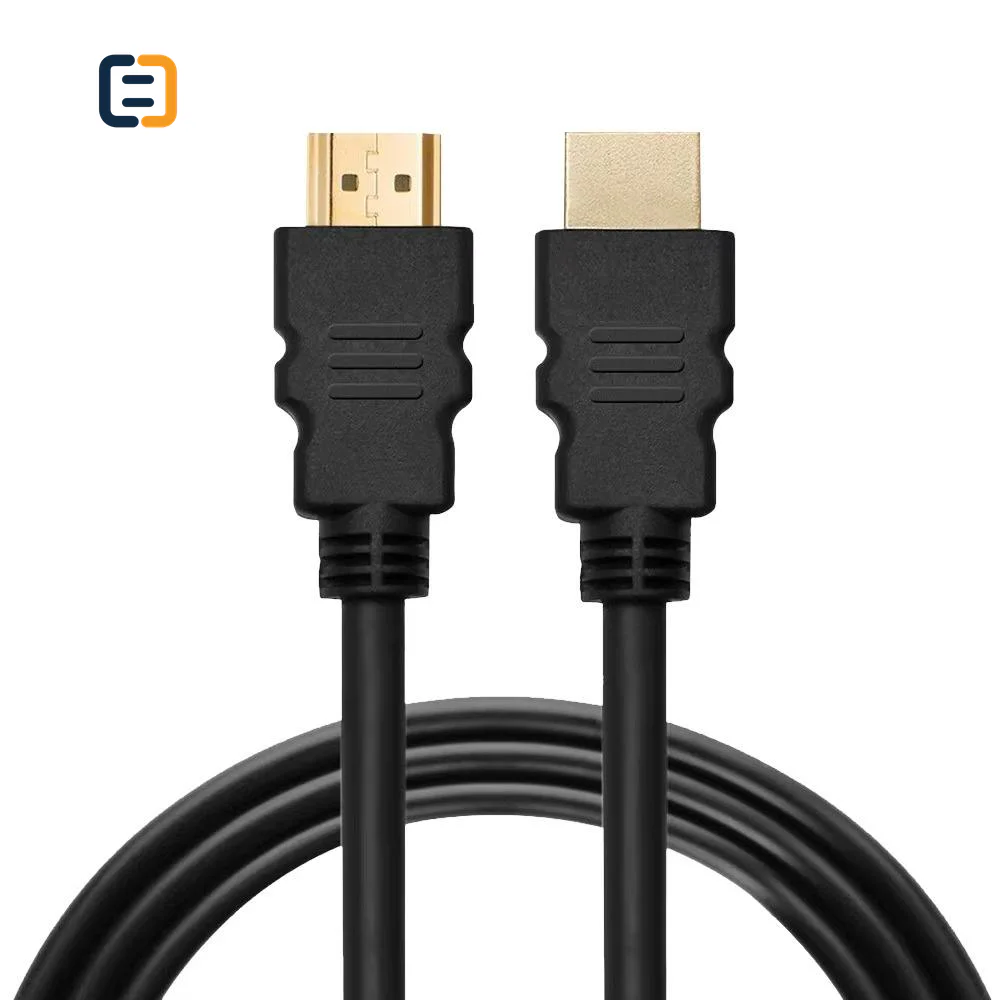
An HDMI cable should be specified against a complete video mode and installation, rather than a version number on a quotation. For a certified 18Gbps cable route, the established designation is Premium High Speed HDMI Cable. Ultra High Speed HDMI Cable covers the class introduced with HDMI 2.1, up to 48Gbps. The connected equipment must support the requested mode as well. A cable cannot add a feature that a source, receiver or display lacks. [1][2]
The difficult part is deciding what a phrase such as “4K60,” “8K cable” or “HDMI 2.1 compatible” actually commits the supplier to deliver. Resolution alone leaves several important conditions unspecified. Color depth, chroma format, compression, timing and the equipment chain can change the answer.
This guide is for procurement engineers, AV integrators and distributors comparing cable quotations. It combines public cable-program information with a reproducible calculation of video data demand. The charts are calculations, not measurements of CoreCavo cables. They cannot certify a cable, predict a maximum installation length or substitute for testing the quoted assembly.
Three findings to use when comparing quotations
- Doubling refresh rate doubles the active-picture data demand when the other conditions stay constant. Moving from 4K to 8K increases the number of active pixels fourfold at the same refresh rate.
- An uncompressed 8K60 RGB image at eight bits per component contains about 47.78Gb/s of active-picture data before transport overhead. An 18Gbps headline therefore cannot establish support for that particular mode.
- A calculated demand below a cable's advertised bandwidth does not prove compatibility. The comparison still needs the transport method, full timing, device support and exact cable evidence.
These observations explain why two offers headed “8K HDMI cable” may describe materially different commitments. Ask for the format and evidence behind the label before comparing unit prices.
Start with the cable category, then define the operating mode
The following table concerns cable procurement. It does not imply that every feature of a specification revision is mandatory in every product, or that every connected device supports the maximum bandwidth associated with its marketing name.
| Buying decision | 18Gbps-class project | Up-to-48Gbps-class project |
|---|---|---|
| Certified cable designation to request | Premium High Speed HDMI Cable | Ultra High Speed HDMI Cable |
| Typical reason for reviewing this route | A specified 4K60 or lower-bandwidth system | A specified higher-bandwidth mode, such as a suitable 4K120 or 8K configuration |
| Information still required | Timing, color format, bit depth, features and connected equipment | The same information, including supported link configuration and any compression |
| Evidence to match | Quoted brand, model, length and applicable certification | Quoted brand, model, length and applicable certification |
| What the name does not establish | Every possible combination of 4K, HDR and color format | Every possible combination of 8K, refresh rate, color depth and chroma |
HDMI Licensing Administrator describes the Premium program as testing the full 18Gbps class. Its public Ultra cable information distinguishes the up-to-48Gbps Ultra High Speed category from the newer up-to-96Gbps Ultra96 category. Use the appropriate program rather than treating those names as interchangeable. [1][2]
An HDMI 2.0a or 2.0b reference in an equipment specification also needs context. For cable procurement, record the actual HDR, color and video requirement. The revision wording does not replace an official cable designation or a mode-specific acceptance criterion. For an existing installation, first establish what the source and display actually negotiate; a label on one port does not describe every component between them.
Method: calculate the active-picture data before discussing cable performance
For an uncompressed RGB image, a useful starting calculation is:
active-picture Gb/s = horizontal pixels × vertical pixels × frames per second × 3 × bits per component ÷ 1,000,000,000
There are three RGB components per pixel. At eight bits per component, each active pixel contributes 24 bits. At ten bits, it contributes 30 bits. For this calculation, 4K means 3840 × 2160 active pixels, 8K means 7680 × 4320, and the refresh rates are exactly 60 or 120 frames per second.
This is a lower-bound calculation for the active image. It excludes blanking intervals, link encoding, transport control and other relevant overhead. It also excludes compression. We use decimal gigabits, so one Gb/s means one billion bits per second.
The distinction matters in both directions. A mode whose active-picture demand already exceeds a link's gross bandwidth cannot fit uncompressed under those assumptions. A mode below that gross figure may still fail once the complete transport is considered. The calculation is an initial rejection check, not a positive compatibility certificate.
| Active image and refresh | RGB depth | Calculated active-picture demand |
|---|---|---|
| 3840 × 2160 at 60Hz | 8 bits/component | 11.94Gb/s |
| 3840 × 2160 at 60Hz | 10 bits/component | 14.93Gb/s |
| 3840 × 2160 at 60Hz | 12 bits/component | 17.92Gb/s |
| 3840 × 2160 at 120Hz | 8 bits/component | 23.89Gb/s |
| 7680 × 4320 at 60Hz | 8 bits/component | 47.78Gb/s |
| 7680 × 4320 at 60Hz | 10 bits/component | 59.72Gb/s |
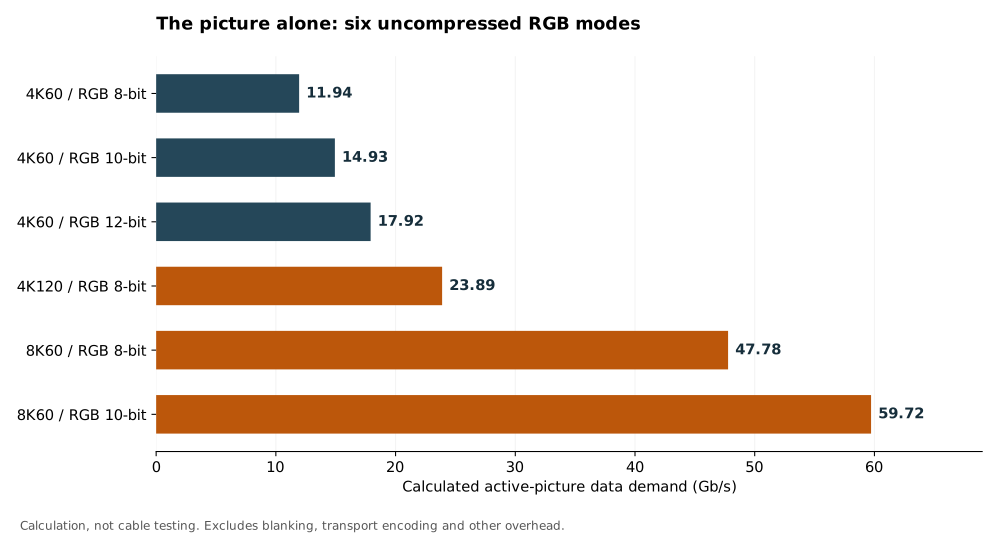
Figure 1. Each bar follows the formula above. The downloadable calculation data records the unrounded values, assumptions and units. No cable samples were measured to produce this chart.
For example, 3840 × 2160 × 60 × 24 gives 11,943,936,000 bits per second. Replacing 60 with 120 produces 23,887,872,000. Replacing the 4K dimensions with the 8K dimensions produces 47,775,744,000 at 60Hz. A buyer can reproduce these numbers without access to a supplier's laboratory.
Why color depth can change a decision that looked settled
An RFQ that says only “4K60” leaves open whether the system uses eight, ten or twelve bits per component. In the uncompressed RGB calculation, changing from eight to ten bits increases active-picture demand by 25%. Changing from eight to twelve increases it by 50%.
That difference is large enough to matter when procurement compares offers with apparently similar resolution claims. A supplier may have demonstrated one color configuration while the buyer assumes another. The remedy is to write the selected color depth into the acceptance condition and capture the actual output format during testing.
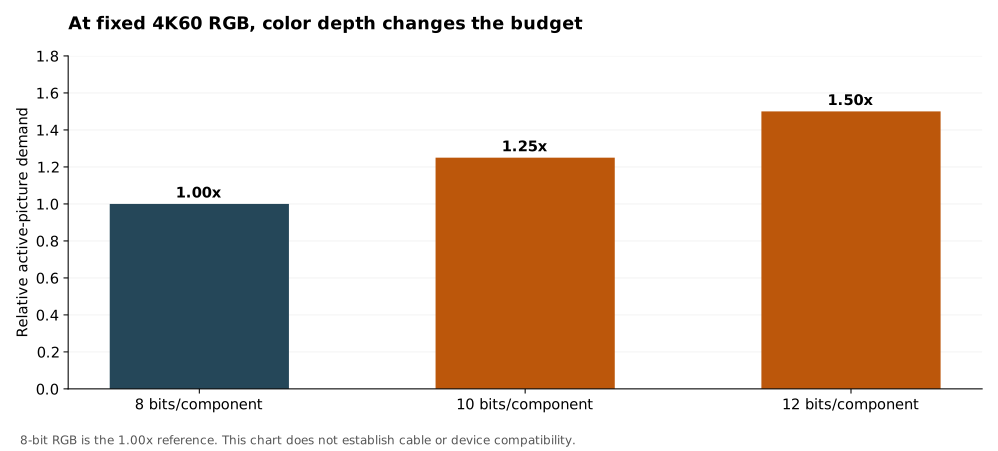
Figure 2. Relative active-picture demand at a fixed resolution and refresh rate. This comparison isolates color depth; it makes no claim about whether a particular cable or device passes a mode.
Chroma sampling is another separate condition. An RGB or YCbCr 4:4:4 claim should not quietly become a reduced-chroma output during an acceptance demonstration. If the application involves desktop text, test patterns or engineering displays, record the actual output format rather than judging only whether a moving picture appears.
Do not use this table to infer a full YCbCr transport calculation. Packing rules and supported formats require their own treatment. For a purchase decision, the practical requirement is simpler: name the exact format and make the supplier's demonstration match it.
What “8K” leaves out, and how to resolve an 18Gbps quotation
An 8K claim without frame rate, color depth, chroma and compression is incomplete. It may refer to a different mode from the one your equipment needs. In particular, the calculated 47.78Gb/s active-picture demand for uncompressed RGB 8K60 at eight bits per component already exceeds 18Gbps before adding transport overhead.
The correct response is to request a mode-specific explanation. Ask which source generated the image, which display received it, which format the devices reported and whether compression or a different color format was used. Also ask whether the bandwidth figure describes the quoted assembly or was copied from another variant's documentation.
Avoid turning an incomplete listing into an unsupported universal statement. This calculation does not establish that every signal described informally as “8K” has the same bandwidth requirement. It also does not show that a particular cable has been measured at any given data rate. It identifies a mismatch that must be resolved before approval.
A comparable quotation might specify the exact active resolution, refresh rate, output color format, bit depth and negotiated transport. It would then identify the cable model and length used to demonstrate that configuration. Without those details, a low price and an “8K” label are insufficient grounds for a technical equivalence decision.
Compression is a system capability, not an undocumented cable upgrade
Display Stream Compression is an example of why active-picture arithmetic and real link behavior need to be kept distinct. Compression can reduce transported data, but it depends on compatible implementation in the equipment path. A passive cable does not add a codec to the source or display.
VESA publishes technical material on DSC and a bibliography of display-compression research. That bibliography includes work on subjective image-quality assessment and display stream compression. These references support treating compression as a defined technical mechanism with evaluation methods; they are not tests of CoreCavo cables. [4][5]
The research references do not justify saying that every compressed mode is identical to its uncompressed counterpart in every application. Nor do they show that a receiver, splitter or wall-plate assembly in your installation passes the required compressed stream. Ask the equipment supplier which combination is supported and how it can be verified.
For a compression-dependent project, include that dependency in the system record. Name the relevant equipment, firmware, output mode and evidence that compression is active when required. If procurement compares a compressed demonstration with an uncompressed requirement, the demonstration has not established the requested result.
Compare exact lengths and constructions, rather than a family headline
A cable family may contain several lengths and constructions. Approval of one combination should not automatically approve the others. A shorter passive copper assembly, an active copper assembly and an active optical assembly can have different installation and service requirements even when they target the same display mode.
Record the installed route, connector clearance and equipment location. For a directional assembly, record which end connects to the source. Where pulling through conduit is involved, obtain the selected model's handling limits and plan a test before and after installation. Do not substitute a generic bend or pulling limit for the actual assembly's instructions.
There is no useful universal statement that every cable of one version works at a particular distance. The procurement unit is the exact model, exact length and agreed workload. An unusually broad length range in a product listing should trigger a question about which length was evaluated for which mode.
Use the active optical cable installation guide when route handling and post-installation acceptance are the main problem. Use it to plan handling checks after the cable route has been selected.
Verify certification against the item being quoted
An official cable-program claim should be traceable to the actual offer. Ask for the brand, cable model, length and verification route, then compare those details with the quotation and sample identification. A generic logo image, an unrelated report or a successful demonstration on another cable is not enough to identify the approved item.
HDMI Licensing Administrator explains the packaging labels and verification process on its Ultra cable page. Use that process when the quotation claims the corresponding official program. Reading a seller's description is a different evidence step from verifying the stated certification. [2]
Keep procurement documents separate by purpose. A material declaration answers a different question from video-performance evidence; neither automatically proves every other requirement. Request the documents needed for the product, destination and contract rather than collecting unrelated badges.
The cable test and compliance documents guide provides a separate document-planning route. Use it to separate performance evidence from material declarations and destination-specific requirements.
Build an acceptance record that another person can repeat
The following is a proposed verification plan, not a report of testing completed by CoreCavo. Its purpose is to make a supplier's result specific enough for a second person to reproduce.
| Record | What to capture | Why the buyer needs it |
|---|---|---|
| Sample identity | Model, length, sample reference and visible identification | Connects the result to the purchased assembly |
| Equipment chain | Source, display and every active intermediate device | Prevents an omitted component from changing the result |
| Configuration | Firmware, selected ports, timing, color, depth and required features | Defines the workload behind a pass statement |
| Installation | Route, connection points, direction and handling state | Separates a bench result from an installed result |
| Procedure | Agreed operating sequence, duration, reconnects and recovery checks | Makes the observation repeatable |
| Outcome | Observed faults, recordings, logs and disposition | Preserves what happened rather than only a pass label |
Agree the operating duration, repetition count and acceptance limits with the responsible technical parties. There is no universal sample size or dwell time supplied by this article. A consumer demonstration, a production inspection and a certification test have different purposes and should not be described as equivalent.
If the agreed video mode is unavailable, preserve the actual negotiated mode and investigate the source, display and intermediary equipment before attributing the result to the cable. If a fault appears, change one relevant component at a time and record the result. The HDMI signal troubleshooting guide covers that diagnostic task in more detail.
Turn the comparison into a quote-ready brief
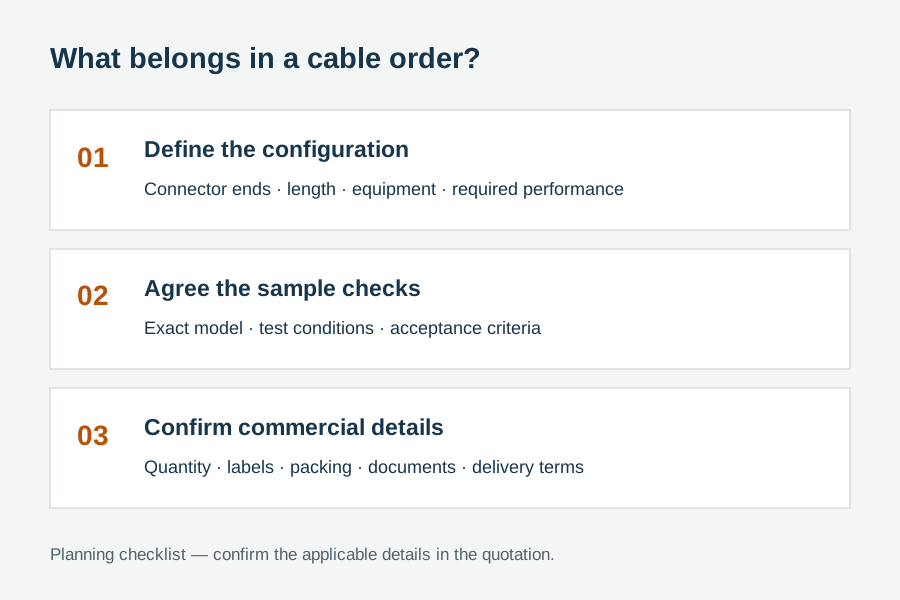
An effective cable RFQ lets suppliers quote the same technical commitment. Include the complete video requirement, equipment chain, exact lengths, connector format, construction constraints, labeling and packaging. Add quantities and destination requirements after the performance requirement is clear.
For example, replace a request for an unspecified “HDMI 2.1 cable” with a brief that names the intended video mode, required system features, exact assembly lengths and the evidence expected for each offered variant. The supplier can then identify which requirements are documented and which need sample verification.
Keep alternatives visible in the quotation. If one offer changes construction, compression dependency, installation limits or verification scope, show that difference explicitly. Procurement can then decide whether the change is acceptable rather than discovering it after a sample or shipment arrives.
Compare the HDMI cable catalog against that brief, or send the system requirements for quotation review. Include the source and display models when available. Product availability, performance evidence, certification and commercial terms remain specific to the offered configuration.
Sources, calculation files and editorial responsibility
- HDMI Licensing Administrator: Premium HDMI Cable Certification Program. Public program scope and the 18Gbps bandwidth class. Accessed October 26, 2026.
- HDMI Licensing Administrator: Ultra96 HDMI Cable and Ultra High Speed HDMI Cable. Public cable names, bandwidth classes and verification information. Accessed October 26, 2026.
- HDMI Licensing Administrator: HDMI Cable Overview. Official cable-category context. Accessed October 26, 2026.
- VESA: Display Stream Compression. Standards-body background on DSC. Accessed October 26, 2026.
- VESA: Display Codecs Bibliography. Publisher references for display-compression and subjective-evaluation research. Bibliographic context only; the listed papers were not reviewed in full for this guide.
Calculation data: six uncompressed RGB active-picture cases. The accompanying generation script reproduces both figures. These are six calculated scenarios, not six physical cable samples or an experiment.
Author and editorial responsibility: WUHAN SUNFULL Cable & Connectivity Division. This guide explains public sources and reproducible calculations; it is not a cable test report. No individual engineer, laboratory review or product certification is claimed.
Update history: October 26, 2026 — added calculation methods, two original charts and a repeatable acceptance-record checklist.